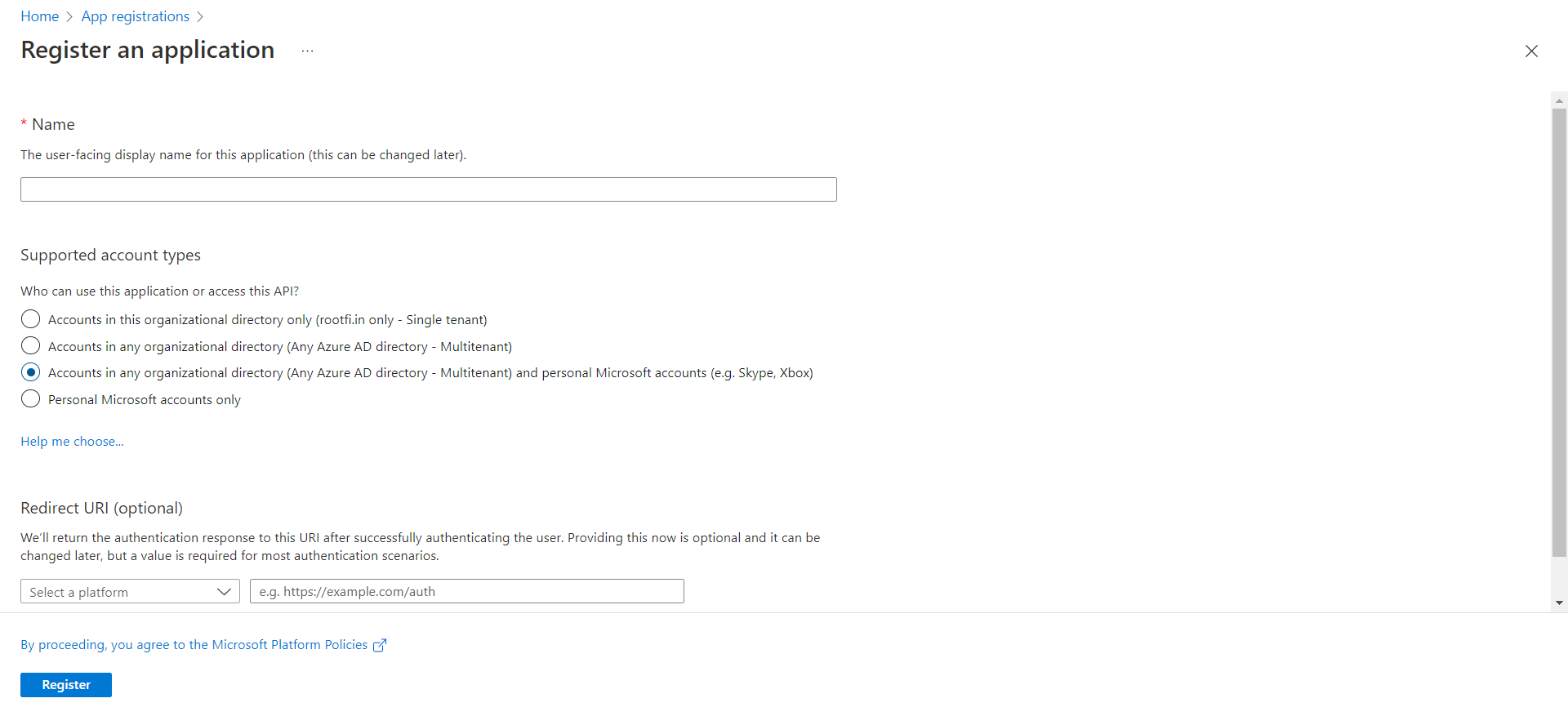
Enter the user-facing display name for this application (this can be changed later).
Select Supported account types: Select Accounts in any organisational directory (Any Azure AD directory - Multi-tenant) and personal Microsoft accounts (e.g. Skype, Xbox). This allows RootFi to access data in Dynamics 365 F&O.
In the Redirect URI, select the dropdown value as Web and in the value, paste the url, ROOTFI CALLBACK URL
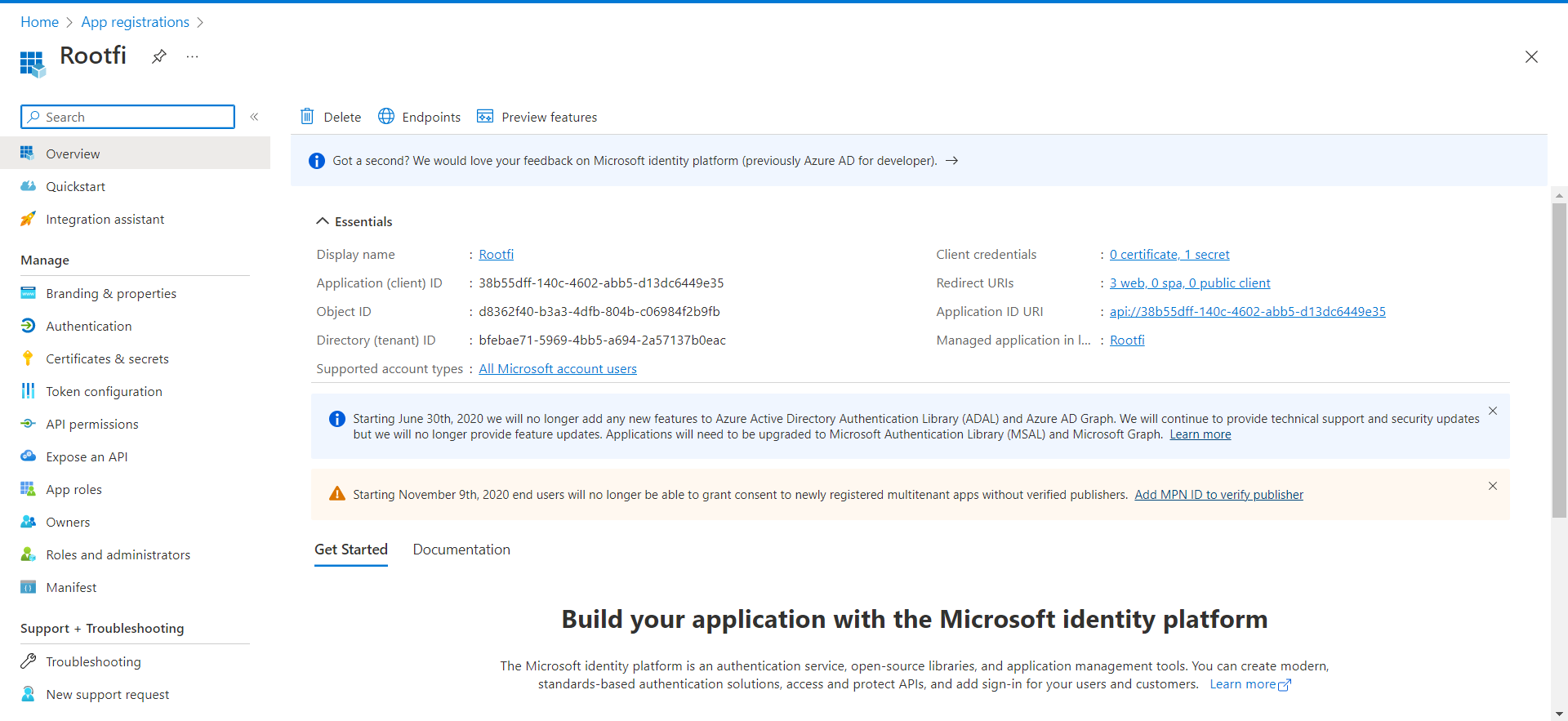
Now Click the Register Button, now you have created an app.
In the Add a client secret dialogue, update the following information:
Description: Enter a short description of your client secret to make it easier to find.
Expires: Select the most appropriate option that complies with your company’s security policy.
Click Add.
Your client secret is generated and displayed at the bottom of the page.
ImportantThe secret value won’t be displayed again in full, so you must copy the value as soon as it gets generated.
Part 1: Set up the F&O account to access the data.
When your customer is connecting their MSD F&O account to RootFi, they will need to enter the client credentials in their F&O dashboard to allow RootFi to access the data.
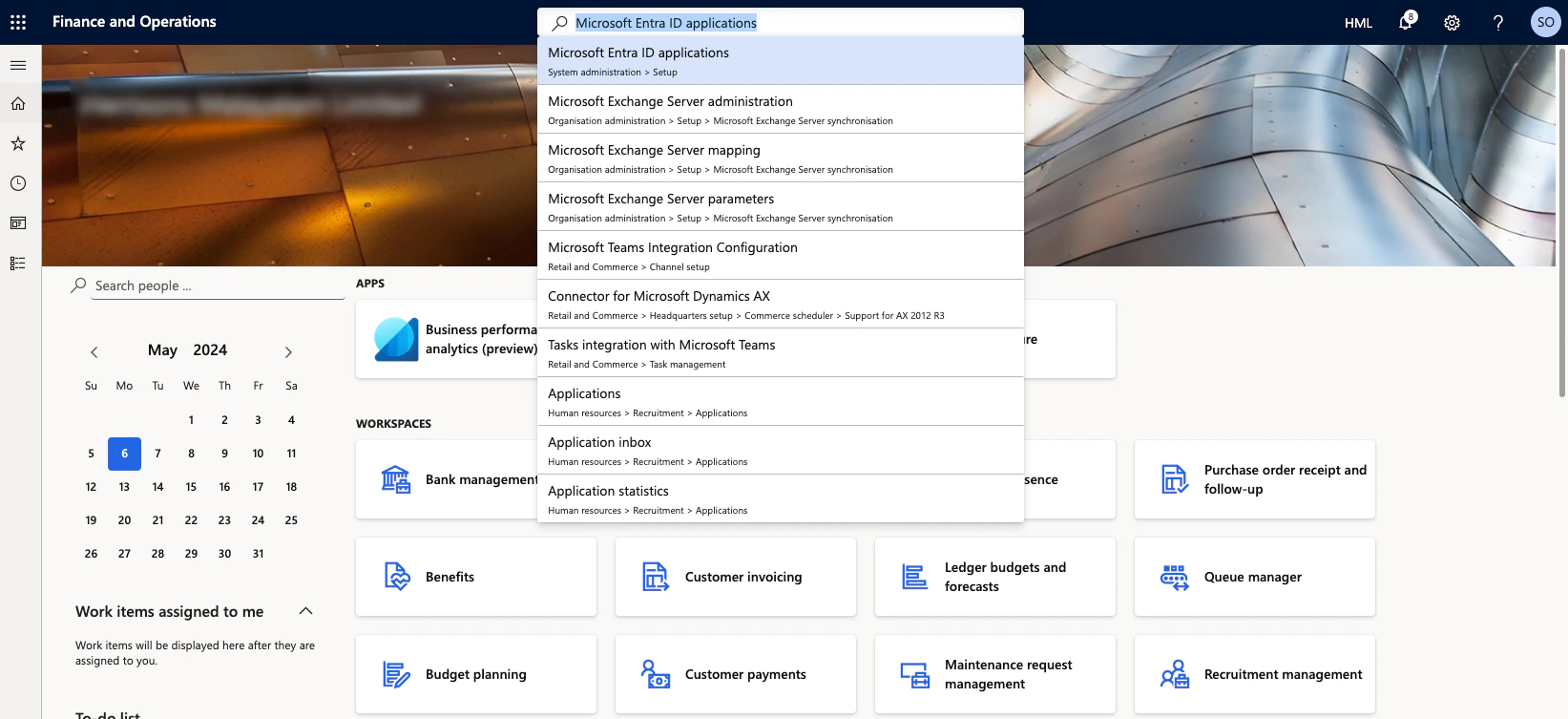
Login to the F&O dashboard and navigate to Microsoft Entra ID applications.
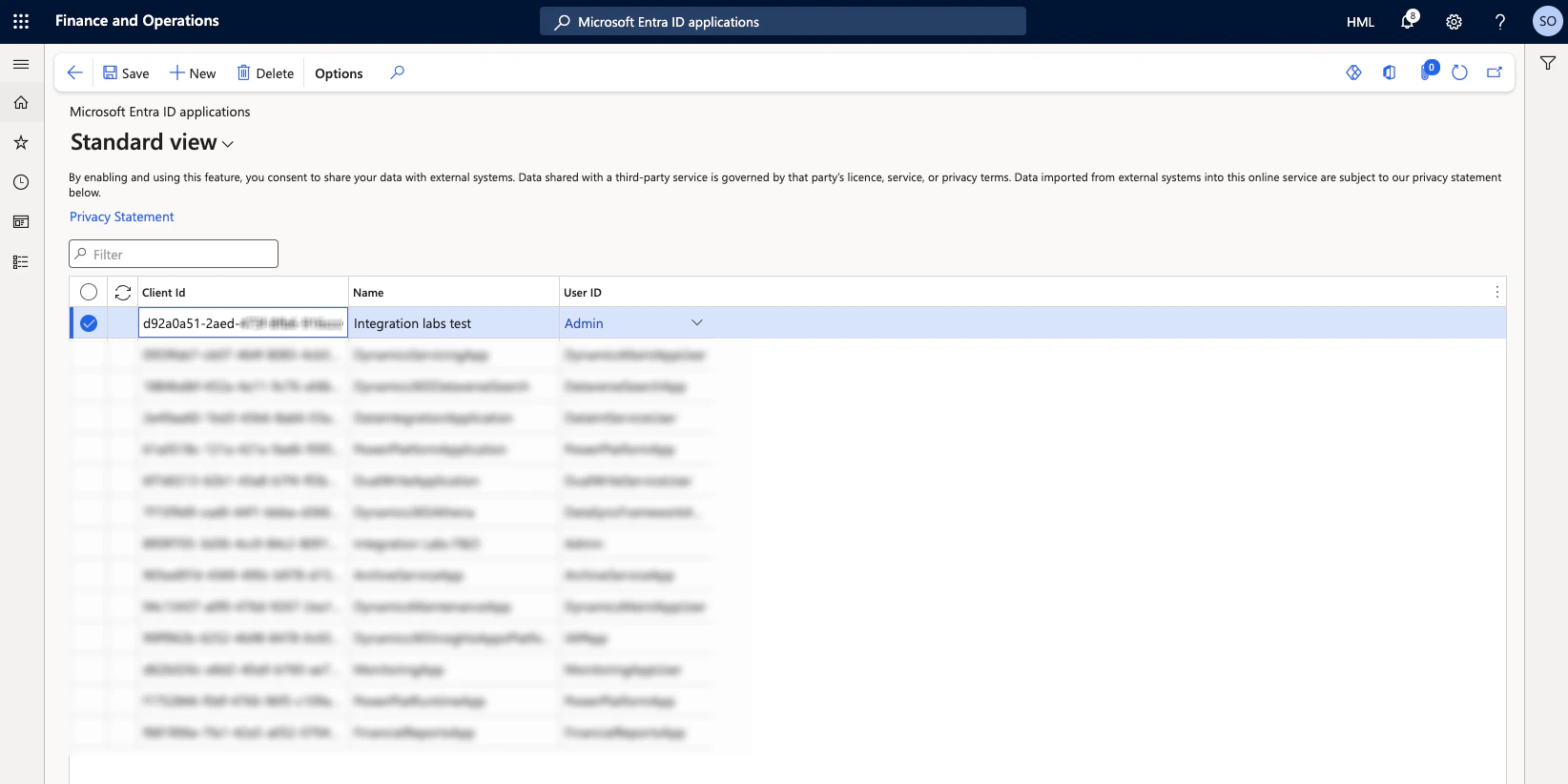
Click on ‘+New’ and enter the client id you copied from the Azure portal, enter a name and set the User ID to ‘Admin’. Enter ‘8f09f705-3d36-4cc9-84c2-8091e362c759’ as the client id if you are using RootFi credentials.
Part 2: Setting up the integration Using RootFi Connect
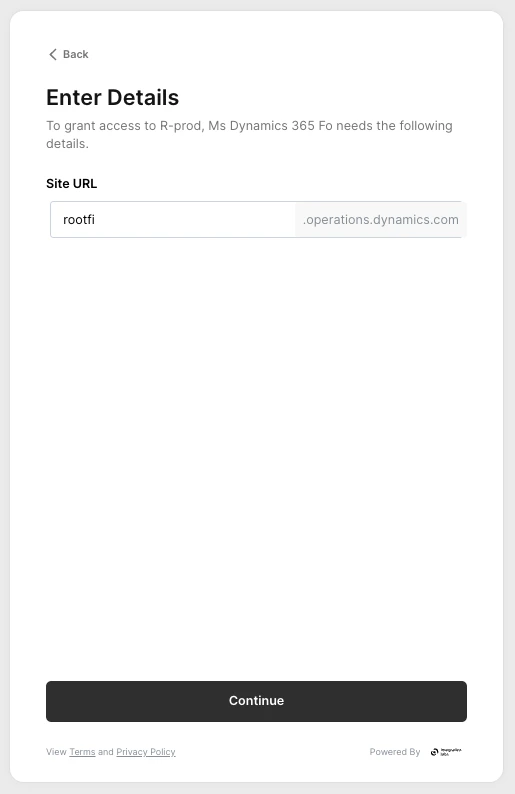
You will need to enter your F&O site url in the RootFi connect screen.
To get the site url, navigate to the F&O dashboard and copy the url from the address bar.
In the RootFi SDK screen, paste the site url of your F&O dashboard without the ‘https://’ and ‘opearations.dynamics.com’ part.
{"docsConfig":{"theme":"palm","$schema":"https://mintlify.com/docs.json","name":"Integrations by Commenda","colors":{"primary":"#026EB9","light":"#026EB9","dark":"#026EB9"},"logo":{"light":"https://mintcdn.com/rootfi-commenda/JtuWvvYArO9DY7fx/images/logo/light.svg?fit=max\u0026auto=format\u0026n=JtuWvvYArO9DY7fx\u0026q=85\u0026s=c4be5f750642af21c9e7cadb00956f3d","dark":"https://mintcdn.com/rootfi-commenda/JtuWvvYArO9DY7fx/images/logo/dark.svg?fit=max\u0026auto=format\u0026n=JtuWvvYArO9DY7fx\u0026q=85\u0026s=97898e15d7a4d649ed69d5fe9fb44de8"},"favicon":"https://mintcdn.com/rootfi-commenda/TwcBuJbylfnuRx_I/images/logo/Favicon%20(1).ico?fit=max\u0026auto=format\u0026n=TwcBuJbylfnuRx_I\u0026q=85\u0026s=03509b4fe29370432ab2dd3eb18a553e","api":{"openapi":["openapi_v3.yml","openapi_v4_core.json"]},"navbar":{"links":[{"href":"https://integrations.docs.commenda.io/openapi_v4_core.json","label":"OpenAPI Spec"}],"primary":{"type":"button","label":"Log In","href":"https://integrations.commenda.io"}},"footer":{"socials":{"linkedin":"https://www.linkedin.com/company/commenda","website":"https://www.commenda.io/"}},"search":{"prompt":"Ask any question (powered by ChatGPT)"},"styling":{"latex":true},"navigation":{"global":{"anchors":[{"anchor":"Data Coverage Tool","icon":"globe","href":"https://coverage.integrationlabs.co/"}]},"pages":[]}},"deployment":{"deploymentMetadataValue":{"subdomain":"rootfi-commenda","hasAudioNarration":false,"actualSubdomain":"rootfi-commenda","customDomains":["integrations.docs.commenda.io"],"gitSource":{"type":"github","owner":"commenda-eng","repo":"rootfi-docs","deployBranch":"main","contentDirectory":"","isPrivate":true,"mountPath":"","label":""},"chroma":{"liveDeploymentHistoryId":"6ad720ed9e4e397945eaa0ad","collectionId":"34fe6b77-13ed-470f-852f-f867a7db72ec","schemaVersion":"v3","latestBuiltDeploymentHistoryId":"6ad720ed9e4e397945eaa0ad"},"entitlements":{"AI_CHAT":{"status":"DISABLED"}},"buildId":"6ad720ed9e4e397945eaa0ad","clientVersion":"0.0.3966","searchFilterCounts":[{"language":"default","tag":"API Reference","count":390},{"language":"default","tag":"Unified API","count":317},{"language":"default","tag":"Accounting","count":208},{"language":"default","tag":"Payments","count":72},{"language":"default","tag":"CRM","count":54},{"language":"default","tag":"Core","count":47},{"language":"default","tag":"Documentation","count":41},{"language":"default","tag":"Accounting Integrations","count":36},{"language":"default","tag":"E-Commerce","count":30},{"language":"default","tag":"Core API","count":21}]},"assistantConfig":{},"hasChatPermissions":false,"hasWebMcpPermissions":false,"toggles":[{"name":"kill-isr","enabled":true,"variant":{"name":"disabled","enabled":false,"feature_enabled":true},"impressionData":false},{"name":"agent-mintlify-slack","enabled":true,"variant":{"name":"disabled","enabled":false,"feature_enabled":true},"impressionData":false},{"name":"editor-v7-file-tree","enabled":true,"variant":{"name":"disabled","enabled":false,"feature_enabled":true},"impressionData":false},{"name":"agent-integrations-settings","enabled":true,"variant":{"name":"disabled","enabled":false,"feature_enabled":true},"impressionData":false},{"name":"automations-pr-grouping","enabled":true,"variant":{"name":"disabled","enabled":false,"feature_enabled":true},"impressionData":false},{"name":"custom-prefix","enabled":true,"variant":{"name":"disabled","enabled":false,"feature_enabled":true},"impressionData":false},{"name":"analytics-v7","enabled":true,"variant":{"name":"disabled","enabled":false,"feature_enabled":true},"impressionData":false},{"name":"user-flows-analytics","enabled":true,"variant":{"name":"disabled","enabled":false,"feature_enabled":true},"impressionData":false},{"name":"no-publish-flow","enabled":true,"variant":{"name":"disabled","enabled":false,"feature_enabled":true},"impressionData":false},{"name":"workos-onboarding","enabled":true,"variant":{"name":"disabled","enabled":false,"feature_enabled":true},"impressionData":false},{"name":"llms-txt-v2","enabled":true,"variant":{"name":"disabled","enabled":false,"feature_enabled":true},"impressionData":false},{"name":"pause-universal-search-reconcile","enabled":true,"variant":{"name":"disabled","enabled":false,"feature_enabled":true},"impressionData":false},{"name":"snapshot-serving-live","enabled":true,"variant":{"name":"disabled","enabled":false,"feature_enabled":true},"impressionData":false},{"name":"stripTemperatureMiddleware","enabled":true,"variant":{"name":"disabled","enabled":false,"feature_enabled":true},"impressionData":false},{"name":"per-site-search-delta","enabled":true,"variant":{"name":"disabled","enabled":false,"feature_enabled":true},"impressionData":false},{"name":"support-platform-pylon-zendesk","enabled":true,"variant":{"name":"disabled","enabled":false,"feature_enabled":true},"impressionData":false},{"name":"snapshot-serving","enabled":true,"variant":{"name":"disabled","enabled":false,"feature_enabled":true},"impressionData":false},{"name":"instant-rollback","enabled":true,"variant":{"name":"disabled","enabled":false,"feature_enabled":true},"impressionData":false},{"name":"granular-notifications-server","enabled":true,"variant":{"name":"disabled","enabled":false,"feature_enabled":true},"impressionData":false},{"name":"granular-notifications","enabled":true,"variant":{"name":"disabled","enabled":false,"feature_enabled":true},"impressionData":false},{"name":"editor-private-page-search","enabled":true,"variant":{"name":"disabled","enabled":false,"feature_enabled":true},"impressionData":false},{"name":"automations-fable","enabled":true,"variant":{"name":"disabled","enabled":false,"feature_enabled":true},"impressionData":false},{"name":"fixed-ai-action-pricing","enabled":true,"variant":{"name":"disabled","enabled":false,"feature_enabled":true},"impressionData":false},{"name":"automation-resolve-merge-conflict","enabled":true,"variant":{"name":"disabled","enabled":false,"feature_enabled":true},"impressionData":false},{"name":"scoped-publishing","enabled":true,"variant":{"name":"disabled","enabled":false,"feature_enabled":true},"impressionData":false},{"name":"mintql","enabled":true,"variant":{"name":"disabled","enabled":false,"feature_enabled":true},"impressionData":false},{"name":"page-level-analytics","enabled":true,"variant":{"name":"disabled","enabled":false,"feature_enabled":true},"impressionData":false},{"name":"editor-version-history-v2","enabled":true,"variant":{"name":"disabled","enabled":false,"feature_enabled":true},"impressionData":false},{"name":"editor-nav-generations","enabled":true,"variant":{"name":"disabled","enabled":false,"feature_enabled":true},"impressionData":false},{"name":"billing-page-v2","enabled":true,"variant":{"name":"disabled","enabled":false,"feature_enabled":true},"impressionData":false},{"name":"workspace-projects","enabled":true,"variant":{"name":"disabled","enabled":false,"feature_enabled":true},"impressionData":false},{"name":"assistant-v5","enabled":true,"variant":{"name":"disabled","enabled":false,"feature_enabled":true},"impressionData":false},{"name":"byok-sep-25","enabled":true,"variant":{"name":"disabled","enabled":false,"feature_enabled":true},"impressionData":false},{"name":"fork-pr-previews","enabled":true,"variant":{"name":"disabled","enabled":false,"feature_enabled":true},"impressionData":false},{"name":"revalidation-jwt","enabled":true,"variant":{"name":"disabled","enabled":false,"feature_enabled":true},"impressionData":false},{"name":"vite-origin","enabled":true,"variant":{"name":"disabled","enabled":false,"feature_enabled":true},"impressionData":false},{"name":"editor-agent-model-picker","enabled":true,"variant":{"name":"disabled","enabled":false,"feature_enabled":true},"impressionData":false},{"name":"billing-updated-9-15","enabled":true,"variant":{"name":"disabled","enabled":false,"feature_enabled":true},"impressionData":false},{"name":"hobby-abuse-scan","enabled":true,"variant":{"name":"disabled","enabled":false,"feature_enabled":true},"impressionData":false},{"name":"dashboard-inbox","enabled":true,"variant":{"name":"disabled","enabled":false,"feature_enabled":true},"impressionData":false}],"isAtlas":false,"googleFontsInlined":false},"customCss":[],"page":{"pagePath":"v3/accounting-integrations/microsoft-dynamics-365-f\u0026o","slug":"/v3/accounting-integrations/microsoft-dynamics-365-f\u0026o","pageMetadata":{"title":"Microsoft Dynamics 365 F\u0026O","description":"Learn how to set up our Microsoft Dynamics 365 F\u0026O integration.","href":"/v3/accounting-integrations/microsoft-dynamics-365-f\u0026o"},"description":{"compiledSource":"\"use strict\";\nconst {jsx: _jsx} = arguments[0];\nconst {useMDXComponents: _provideComponents} = arguments[0];\nfunction _createMdxContent(props) {\n const _components = {\n p: \"p\",\n ..._provideComponents(),\n ...props.components\n };\n return _jsx(_components.p, {\n children: \"Learn how to set up our Microsoft Dynamics 365 F\u0026O integration.\"\n });\n}\nfunction MDXContent(props = {}) {\n const {wrapper: MDXLayout} = {\n ..._provideComponents(),\n ...props.components\n };\n return MDXLayout ? _jsx(MDXLayout, {\n ...props,\n children: _jsx(_createMdxContent, {\n ...props\n })\n }) : _createMdxContent(props);\n}\nreturn {\n default: MDXContent\n};\n","frontmatter":{},"scope":{}},"pageType":"default","mdx":{"mdxSource":{"compiledSource":"\"use strict\";const{Fragment:_Fragment,jsx:_jsx,jsxs:_jsxs}=arguments[0];const{useMDXComponents:_provideComponents}=arguments[0];function _createMdxContent(props){const _components={a:`a`,br:`br`,hr:`hr`,li:`li`,ol:`ol`,p:`p`,strong:`strong`,..._provideComponents(),...props.components},{Heading,OptimizedImage,Tip}=_components;if(!Heading)_missingMdxReference(`Heading`,true);if(!OptimizedImage)_missingMdxReference(`OptimizedImage`,true);if(!Tip)_missingMdxReference(`Tip`,true);return _jsxs(_Fragment,{children:[_jsx(_components.p,{children:`If you wish to set up Microsoft Dynamics 365 F\u0026O on the RootFi Portal, you will need to follow the steps outlined below.`}),`\n`,_jsx(_components.hr,{}),`\n`,_jsx(Heading,{level:`2`,id:`setting-up-oauth-credentials`,children:`Setting up OAuth Credentials`}),`\n`,_jsx(Heading,{level:`3`,id:`part-1-create-an-app`,children:`Part 1: Create an App`}),`\n`,_jsxs(_components.p,{children:[`Follow the link `,_jsx(_components.a,{href:`https://portal.azure.com/#view/Microsoft_AAD_RegisteredApps/ApplicationsListBlade`,children:`https://portal.azure.com/#view/Microsoft_AAD_RegisteredApps/ApplicationsListBlade`})]}),`\n`,_jsx(_components.p,{children:`Click on the +New Registration, you will see a form like this.`}),`\n`,_jsx(OptimizedImage,{src:`https://mintcdn.com/rootfi-commenda/Ww3YPpDlQzbumiZY/images/a5c5a30-Screenshot_2973.png?fit=max\u0026auto=format\u0026n=Ww3YPpDlQzbumiZY\u0026q=85\u0026s=a028e7eff6c0db308581be398dbf6e4b`,alt:``,\"data-og-width\":`1920`,width:`1920`,\"data-og-height\":`877`,height:`877`,\"data-path\":`images/a5c5a30-Screenshot_2973.png`,\"data-optimize\":`true`,\"data-opv\":`3`,srcset:`https://mintcdn.com/rootfi-commenda/Ww3YPpDlQzbumiZY/images/a5c5a30-Screenshot_2973.png?w=280\u0026fit=max\u0026auto=format\u0026n=Ww3YPpDlQzbumiZY\u0026q=85\u0026s=81fccc39d9c33fd5ffd6362515fb5011 280w, https://mintcdn.com/rootfi-commenda/Ww3YPpDlQzbumiZY/images/a5c5a30-Screenshot_2973.png?w=560\u0026fit=max\u0026auto=format\u0026n=Ww3YPpDlQzbumiZY\u0026q=85\u0026s=cffba03743941a3caa2e5adf24c1d897 560w, https://mintcdn.com/rootfi-commenda/Ww3YPpDlQzbumiZY/images/a5c5a30-Screenshot_2973.png?w=840\u0026fit=max\u0026auto=format\u0026n=Ww3YPpDlQzbumiZY\u0026q=85\u0026s=dc7690d108898678d5e7ddd1ae7c3a12 840w, https://mintcdn.com/rootfi-commenda/Ww3YPpDlQzbumiZY/images/a5c5a30-Screenshot_2973.png?w=1100\u0026fit=max\u0026auto=format\u0026n=Ww3YPpDlQzbumiZY\u0026q=85\u0026s=79ad95659d27f6490264a40f77c92687 1100w, https://mintcdn.com/rootfi-commenda/Ww3YPpDlQzbumiZY/images/a5c5a30-Screenshot_2973.png?w=1650\u0026fit=max\u0026auto=format\u0026n=Ww3YPpDlQzbumiZY\u0026q=85\u0026s=f4b40b7fc5babd7432043339c14fdd7f 1650w, https://mintcdn.com/rootfi-commenda/Ww3YPpDlQzbumiZY/images/a5c5a30-Screenshot_2973.png?w=2500\u0026fit=max\u0026auto=format\u0026n=Ww3YPpDlQzbumiZY\u0026q=85\u0026s=13f4eae8a974e11c2a079698ece9c328 2500w`}),`\n`,_jsxs(_components.ol,{children:[`\n`,_jsx(_components.li,{children:`Enter the user-facing display name for this application (this can be changed later).`}),`\n`,_jsx(_components.li,{children:`Select Supported account types: Select Accounts in any organisational directory (Any Azure AD directory - Multi-tenant) and personal Microsoft accounts (e.g. Skype, Xbox). This allows RootFi to access data in Dynamics 365 F\u0026O.`}),`\n`,_jsxs(_components.li,{children:[`In the Redirect URI, select the dropdown value as Web and in the value, paste the url, `,_jsx(_components.a,{href:`/api-reference/v3/overview/environments#callback-urls`,children:`ROOTFI CALLBACK URL`})]}),`\n`,_jsx(_components.li,{children:`Now Click the Register Button, now you have created an app.`}),`\n`,_jsx(_components.li,{children:`Below, You can see the newly created app.`}),`\n`]}),`\n`,_jsx(Heading,{level:`3`,id:`part-2-copy-client-id-and-client-secret`,children:`Part 2: Copy Client ID and Client Secret`}),`\n`,_jsxs(_components.ol,{children:[`\n`,_jsx(_components.li,{children:`Click on the newly created app, Go to the Overview section, you can see the Application Client ID similar to 38b55dff-140c-4602-abb5-d13dc644.`}),`\n`]}),`\n`,_jsx(OptimizedImage,{src:`https://mintcdn.com/rootfi-commenda/Ww3YPpDlQzbumiZY/images/65ad5f0-Screenshot_2962.png?fit=max\u0026auto=format\u0026n=Ww3YPpDlQzbumiZY\u0026q=85\u0026s=8191747c7a4c99e96b7bcbe082fd7cf1`,alt:`Client ID MS Dynamics`,\"data-og-width\":`1920`,width:`1920`,\"data-og-height\":`883`,height:`883`,\"data-path\":`images/65ad5f0-Screenshot_2962.png`,\"data-optimize\":`true`,\"data-opv\":`3`,srcset:`https://mintcdn.com/rootfi-commenda/Ww3YPpDlQzbumiZY/images/65ad5f0-Screenshot_2962.png?w=280\u0026fit=max\u0026auto=format\u0026n=Ww3YPpDlQzbumiZY\u0026q=85\u0026s=4917b01320d78dcbed7629b545e2c024 280w, https://mintcdn.com/rootfi-commenda/Ww3YPpDlQzbumiZY/images/65ad5f0-Screenshot_2962.png?w=560\u0026fit=max\u0026auto=format\u0026n=Ww3YPpDlQzbumiZY\u0026q=85\u0026s=8b759cb88c928e497c5769e1ef4ecc65 560w, https://mintcdn.com/rootfi-commenda/Ww3YPpDlQzbumiZY/images/65ad5f0-Screenshot_2962.png?w=840\u0026fit=max\u0026auto=format\u0026n=Ww3YPpDlQzbumiZY\u0026q=85\u0026s=30d14e48478103e1307b764ca8ec2dea 840w, https://mintcdn.com/rootfi-commenda/Ww3YPpDlQzbumiZY/images/65ad5f0-Screenshot_2962.png?w=1100\u0026fit=max\u0026auto=format\u0026n=Ww3YPpDlQzbumiZY\u0026q=85\u0026s=a337819326843063fb80a42d703096b3 1100w, https://mintcdn.com/rootfi-commenda/Ww3YPpDlQzbumiZY/images/65ad5f0-Screenshot_2962.png?w=1650\u0026fit=max\u0026auto=format\u0026n=Ww3YPpDlQzbumiZY\u0026q=85\u0026s=3920d303866806359c742d69a0fe6621 1650w, https://mintcdn.com/rootfi-commenda/Ww3YPpDlQzbumiZY/images/65ad5f0-Screenshot_2962.png?w=2500\u0026fit=max\u0026auto=format\u0026n=Ww3YPpDlQzbumiZY\u0026q=85\u0026s=d0274f4b16cd683aaf21e0da12b93ecb 2500w`}),`\n`,_jsx(Heading,{level:`3`,id:`part-3-generate-and-retrieve-your-client-secret`,children:`Part 3: Generate and retrieve your client secret`}),`\n`,_jsx(_components.p,{children:`In the Azure Portal:`}),`\n`,_jsxs(_components.ol,{children:[`\n`,_jsx(_components.li,{children:`Select Certificates \u0026 secrets in the left menu.`}),`\n`,_jsx(_components.li,{children:`Under Client secrets, click New client secret.`}),`\n`,_jsx(_components.li,{children:`In the Add a client secret dialogue, update the following information:`}),`\n`,_jsxs(_components.li,{children:[`Description: Enter a short description of your client secret to make it easier to find.`,_jsx(_components.br,{}),`\n`,`Expires: Select the most appropriate option that complies with your company’s security policy.`,_jsx(_components.br,{}),`\n`,`Click Add.`]}),`\n`]}),`\n`,_jsxs(_components.p,{children:[`Your `,_jsx(_components.strong,{children:`client secret`}),` is generated and displayed at the bottom of the page.`]}),`\n`,_jsxs(Tip,{children:[_jsx(_components.p,{children:_jsx(_components.strong,{children:`Important`})}),_jsx(_components.p,{children:`The secret value won’t be displayed again in full, so you must copy the value as soon as it gets generated.`})]}),`\n`,_jsx(Heading,{level:`3`,id:`part-4-enter-your-client-id-and-client-secret-on-the-rootfi-dashboard`,children:`Part 4: Enter Your Client ID and Client Secret on the RootFi Dashboard`}),`\n`,_jsxs(_components.ol,{children:[`\n`,_jsx(_components.li,{children:`Login to the RootFi dashboard.`}),`\n`,_jsx(_components.li,{children:`Select the ‘Integrations’ tab on the sidebar - here you will see a list of platforms you can integrate with.`}),`\n`,_jsx(_components.li,{children:`Click the ‘Set Up’ button on the MS Dynamics 365 card.`}),`\n`,_jsx(_components.li,{children:`When the form opens up simply enter the ‘Client ID’ and ‘Client Secret’ that you generated and click ‘Save’.`}),`\n`]}),`\n`,_jsx(Heading,{level:`2`,id:`adding-oauth-credentials-to-clients-f\u0026o-account`,children:`Adding OAuth Credentials to Clients F\u0026O Account`}),`\n`,_jsx(_components.p,{children:`These steps have to be followed by the end-user who is connecting their F\u0026O account to RootFi.`}),`\n`,_jsx(Heading,{level:`3`,id:`part-1-set-up-the-f\u0026o-account-to-access-the-data`,children:`Part 1: Set up the F\u0026O account to access the data.`}),`\n`,_jsx(_components.p,{children:`When your customer is connecting their MSD F\u0026O account to RootFi, they will need to enter the client credentials in their F\u0026O dashboard to allow RootFi to access the data.`}),`\n`,_jsxs(_components.ol,{children:[`\n`,_jsxs(_components.li,{children:[`Login to the F\u0026O dashboard and navigate to Microsoft Entra ID applications.`,`\n`,_jsx(OptimizedImage,{src:`https://mintcdn.com/rootfi-commenda/JIWggfJznJdOtanp/images/msdF\u0026O/navigateDashboard.png?fit=max\u0026auto=format\u0026n=JIWggfJznJdOtanp\u0026q=85\u0026s=cb2eae1c261d6b2ef409d1b812a5822a`,alt:`Client ID MS Dynamics`,\"data-og-width\":`1643`,width:`1643`,\"data-og-height\":`753`,height:`753`,\"data-path\":`images/msdF\u0026O/navigateDashboard.png`,\"data-optimize\":`true`,\"data-opv\":`3`,srcset:`https://mintcdn.com/rootfi-commenda/JIWggfJznJdOtanp/images/msdF\u0026O/navigateDashboard.png?w=280\u0026fit=max\u0026auto=format\u0026n=JIWggfJznJdOtanp\u0026q=85\u0026s=dcf542b94023b13867fb9a2255ddac85 280w, https://mintcdn.com/rootfi-commenda/JIWggfJznJdOtanp/images/msdF\u0026O/navigateDashboard.png?w=560\u0026fit=max\u0026auto=format\u0026n=JIWggfJznJdOtanp\u0026q=85\u0026s=1544f7852d94d45c1ec7edf3a0a0c645 560w, https://mintcdn.com/rootfi-commenda/JIWggfJznJdOtanp/images/msdF\u0026O/navigateDashboard.png?w=840\u0026fit=max\u0026auto=format\u0026n=JIWggfJznJdOtanp\u0026q=85\u0026s=95e1a7adbd00c1908b8c41b7b6aebf0c 840w, https://mintcdn.com/rootfi-commenda/JIWggfJznJdOtanp/images/msdF\u0026O/navigateDashboard.png?w=1100\u0026fit=max\u0026auto=format\u0026n=JIWggfJznJdOtanp\u0026q=85\u0026s=20522e7f28c0c98744be3d5f04fd8069 1100w, https://mintcdn.com/rootfi-commenda/JIWggfJznJdOtanp/images/msdF\u0026O/navigateDashboard.png?w=1650\u0026fit=max\u0026auto=format\u0026n=JIWggfJznJdOtanp\u0026q=85\u0026s=7975b198df9846e423203a6c9cd77577 1650w, https://mintcdn.com/rootfi-commenda/JIWggfJznJdOtanp/images/msdF\u0026O/navigateDashboard.png?w=2500\u0026fit=max\u0026auto=format\u0026n=JIWggfJznJdOtanp\u0026q=85\u0026s=6ca59d517732179682af65640901dedf 2500w`}),`\n`]}),`\n`,_jsxs(_components.li,{children:[`Click on ‘+New’ and enter the client id you copied from the Azure portal, enter a name and set the User ID to ‘Admin’. Enter ‘8f09f705-3d36-4cc9-84c2-8091e362c759’ as the client id if you are using RootFi credentials.`,`\n`,_jsx(OptimizedImage,{src:`https://mintcdn.com/rootfi-commenda/JIWggfJznJdOtanp/images/msdF\u0026O/dashboard.png?fit=max\u0026auto=format\u0026n=JIWggfJznJdOtanp\u0026q=85\u0026s=5e6beaeca48cebbaceee2134a8b46e21`,alt:`Client ID MS Dynamics`,\"data-og-width\":`1644`,width:`1644`,\"data-og-height\":`822`,height:`822`,\"data-path\":`images/msdF\u0026O/dashboard.png`,\"data-optimize\":`true`,\"data-opv\":`3`,srcset:`https://mintcdn.com/rootfi-commenda/JIWggfJznJdOtanp/images/msdF\u0026O/dashboard.png?w=280\u0026fit=max\u0026auto=format\u0026n=JIWggfJznJdOtanp\u0026q=85\u0026s=465077960251aca4f3e1241f36856529 280w, https://mintcdn.com/rootfi-commenda/JIWggfJznJdOtanp/images/msdF\u0026O/dashboard.png?w=560\u0026fit=max\u0026auto=format\u0026n=JIWggfJznJdOtanp\u0026q=85\u0026s=0533a169e0f71ff0ce955ae987fb7358 560w, https://mintcdn.com/rootfi-commenda/JIWggfJznJdOtanp/images/msdF\u0026O/dashboard.png?w=840\u0026fit=max\u0026auto=format\u0026n=JIWggfJznJdOtanp\u0026q=85\u0026s=0588b32efecb860a45d81d0ae36b55fa 840w, https://mintcdn.com/rootfi-commenda/JIWggfJznJdOtanp/images/msdF\u0026O/dashboard.png?w=1100\u0026fit=max\u0026auto=format\u0026n=JIWggfJznJdOtanp\u0026q=85\u0026s=fe86db51fe1e8d97eb1fe4b6957aa78d 1100w, https://mintcdn.com/rootfi-commenda/JIWggfJznJdOtanp/images/msdF\u0026O/dashboard.png?w=1650\u0026fit=max\u0026auto=format\u0026n=JIWggfJznJdOtanp\u0026q=85\u0026s=dfa620eeb1167f31e435f39b6becc846 1650w, https://mintcdn.com/rootfi-commenda/JIWggfJznJdOtanp/images/msdF\u0026O/dashboard.png?w=2500\u0026fit=max\u0026auto=format\u0026n=JIWggfJznJdOtanp\u0026q=85\u0026s=1ccded5e3126fb2f2339fa30edb73e89 2500w`}),`\n`]}),`\n`]}),`\n`,_jsx(Heading,{level:`3`,id:`part-2-setting-up-the-integration-using-rootfi-connect`,children:`Part 2: Setting up the integration Using RootFi Connect`}),`\n`,_jsx(_components.p,{children:`You will need to enter your F\u0026O site url in the RootFi connect screen.`}),`\n`,_jsxs(_components.ol,{children:[`\n`,_jsxs(_components.li,{children:[`To get the site url, navigate to the F\u0026O dashboard and copy the url from the address bar.`,`\n`,_jsx(OptimizedImage,{src:`https://mintcdn.com/rootfi-commenda/JIWggfJznJdOtanp/images/msdF\u0026O/url.png?fit=max\u0026auto=format\u0026n=JIWggfJznJdOtanp\u0026q=85\u0026s=ffd47a5b011aafd59067d6a5cc8b596b`,alt:`Client ID MS Dynamics`,\"data-og-width\":`1645`,width:`1645`,\"data-og-height\":`220`,height:`220`,\"data-path\":`images/msdF\u0026O/url.png`,\"data-optimize\":`true`,\"data-opv\":`3`,srcset:`https://mintcdn.com/rootfi-commenda/JIWggfJznJdOtanp/images/msdF\u0026O/url.png?w=280\u0026fit=max\u0026auto=format\u0026n=JIWggfJznJdOtanp\u0026q=85\u0026s=c127932f3fbcda6cf62c75b130932f6f 280w, https://mintcdn.com/rootfi-commenda/JIWggfJznJdOtanp/images/msdF\u0026O/url.png?w=560\u0026fit=max\u0026auto=format\u0026n=JIWggfJznJdOtanp\u0026q=85\u0026s=75e2c2fc6b94de55cf3e267357fa5f3b 560w, https://mintcdn.com/rootfi-commenda/JIWggfJznJdOtanp/images/msdF\u0026O/url.png?w=840\u0026fit=max\u0026auto=format\u0026n=JIWggfJznJdOtanp\u0026q=85\u0026s=1fc4eaa230fa6ee587249ee8ae5b5765 840w, https://mintcdn.com/rootfi-commenda/JIWggfJznJdOtanp/images/msdF\u0026O/url.png?w=1100\u0026fit=max\u0026auto=format\u0026n=JIWggfJznJdOtanp\u0026q=85\u0026s=d5af7c1118a39c26ef6f28be7858a420 1100w, https://mintcdn.com/rootfi-commenda/JIWggfJznJdOtanp/images/msdF\u0026O/url.png?w=1650\u0026fit=max\u0026auto=format\u0026n=JIWggfJznJdOtanp\u0026q=85\u0026s=d396a032457d417af6bc0e2bd462dc37 1650w, https://mintcdn.com/rootfi-commenda/JIWggfJznJdOtanp/images/msdF\u0026O/url.png?w=2500\u0026fit=max\u0026auto=format\u0026n=JIWggfJznJdOtanp\u0026q=85\u0026s=7e78c0d550de668c78863eac5c190361 2500w`}),`\n`]}),`\n`,_jsxs(_components.li,{children:[`In the RootFi SDK screen, paste the site url of your F\u0026O dashboard without the ‘https://’ and ‘opearations.dynamics.com’ part.`,`\n`,_jsx(OptimizedImage,{src:`https://mintcdn.com/rootfi-commenda/JIWggfJznJdOtanp/images/msdF\u0026O/sdk.png?fit=max\u0026auto=format\u0026n=JIWggfJznJdOtanp\u0026q=85\u0026s=3fe54483854253bd4aa326d42821718b`,alt:`Client ID MS Dynamics`,\"data-og-width\":`515`,width:`515`,\"data-og-height\":`794`,height:`794`,\"data-path\":`images/msdF\u0026O/sdk.png`,\"data-optimize\":`true`,\"data-opv\":`3`,srcset:`https://mintcdn.com/rootfi-commenda/JIWggfJznJdOtanp/images/msdF\u0026O/sdk.png?w=280\u0026fit=max\u0026auto=format\u0026n=JIWggfJznJdOtanp\u0026q=85\u0026s=15fd982c13f617ec2a15dc7e1c352f82 280w, https://mintcdn.com/rootfi-commenda/JIWggfJznJdOtanp/images/msdF\u0026O/sdk.png?w=560\u0026fit=max\u0026auto=format\u0026n=JIWggfJznJdOtanp\u0026q=85\u0026s=4b264e9bebb9789953aa04e31619e683 560w, https://mintcdn.com/rootfi-commenda/JIWggfJznJdOtanp/images/msdF\u0026O/sdk.png?w=840\u0026fit=max\u0026auto=format\u0026n=JIWggfJznJdOtanp\u0026q=85\u0026s=6eac5b04c1a47e1e4aceca4937e98470 840w, https://mintcdn.com/rootfi-commenda/JIWggfJznJdOtanp/images/msdF\u0026O/sdk.png?w=1100\u0026fit=max\u0026auto=format\u0026n=JIWggfJznJdOtanp\u0026q=85\u0026s=f1fddec3c7e249fa0af823e9dfb4bffe 1100w, https://mintcdn.com/rootfi-commenda/JIWggfJznJdOtanp/images/msdF\u0026O/sdk.png?w=1650\u0026fit=max\u0026auto=format\u0026n=JIWggfJznJdOtanp\u0026q=85\u0026s=c29c06b9b5a3a3fae017a1f41a3fcb07 1650w, https://mintcdn.com/rootfi-commenda/JIWggfJznJdOtanp/images/msdF\u0026O/sdk.png?w=2500\u0026fit=max\u0026auto=format\u0026n=JIWggfJznJdOtanp\u0026q=85\u0026s=1a929411b776dba7d1aefb6dda700c4c 2500w`}),`\n`]}),`\n`]})]})}function MDXContent(props={}){const{wrapper:MDXLayout}={..._provideComponents(),...props.components};return MDXLayout?_jsx(MDXLayout,{...props,children:_jsx(_createMdxContent,{...props})}):_createMdxContent(props)}return{default:MDXContent};function _missingMdxReference(id,component){throw new Error(`Expected `+(component?`component`:`object`)+\" `\"+id+\"` to be defined: you likely forgot to import, pass, or provide it.\")}","frontmatter":{},"scope":{"config":{},"pageMetadata":{"title":"Microsoft Dynamics 365 F\u0026O","description":"Learn how to set up our Microsoft Dynamics 365 F\u0026O integration.","href":"/v3/accounting-integrations/microsoft-dynamics-365-f\u0026o"}}},"mdxSourceWithNoJs":null},"mdxExtracts":{"tableOfContents":[{"title":"Setting up OAuth Credentials","slug":"setting-up-oauth-credentials","depth":2,"children":[{"title":"Part 1: Create an App","slug":"part-1-create-an-app","depth":3,"children":[]},{"title":"Part 2: Copy Client ID and Client Secret","slug":"part-2-copy-client-id-and-client-secret","depth":3,"children":[]},{"title":"Part 3: Generate and retrieve your client secret","slug":"part-3-generate-and-retrieve-your-client-secret","depth":3,"children":[]},{"title":"Part 4: Enter Your Client ID and Client Secret on the RootFi Dashboard","slug":"part-4-enter-your-client-id-and-client-secret-on-the-rootfi-dashboard","depth":3,"children":[]}]},{"title":"Adding OAuth Credentials to Clients F\u0026O Account","slug":"adding-oauth-credentials-to-clients-f\u0026o-account","depth":2,"children":[{"title":"Part 1: Set up the F\u0026O account to access the data.","slug":"part-1-set-up-the-f\u0026o-account-to-access-the-data","depth":3,"children":[]},{"title":"Part 2: Setting up the integration Using RootFi Connect","slug":"part-2-setting-up-the-integration-using-rootfi-connect","depth":3,"children":[]}]}],"codeExamples":{}},"jsLinks":[],"subdomain":"rootfi-commenda","siteName":"Integrations by Commenda","title":"Microsoft Dynamics 365 F\u0026O - Integrations by Commenda","navMaps":{"firstHrefInVersion":{"v4":{"href":"/accounting-integrations/microsoft-dynamics-365-f\u0026o","matchLevel":1},"v3":{"href":"/v3/accounting-integrations/microsoft-dynamics-365-f\u0026o","matchLevel":0}},"firstHrefInLanguage":{}},"lastModified":"2026-07-27T19:40:20.114Z","originalFileLocation":"v3/accounting-integrations/microsoft-dynamics-365-f\u0026o.mdx"},"headHtml":"\u003cscript data-mint-head>(function(){var d=document.documentElement,p=null;if(!p){try{p=localStorage.getItem(\"isDarkMode\")}catch(e){}if(p==='true')p='dark';else if(p==='false')p='light';if(p!=='light'\u0026\u0026p!=='dark'\u0026\u0026p!=='system')p=\"system\"}var r=p==='system'?(matchMedia(\"(prefers-color-scheme: dark)\").matches?'dark':'light'):p;d.classList.remove(r==='dark'?'light':'dark');d.classList.add(r);d.setAttribute(\"data-theme-preference\",p)})();\u003c/script>\u003cmeta data-mint-head name=\"description\" content=\"Learn how to set up our Microsoft Dynamics 365 F\u0026amp;O integration.\">\u003cmeta data-mint-head name=\"application-name\" content=\"Integrations by Commenda\">\u003cmeta data-mint-head name=\"generator\" content=\"Mintlify\">\u003clink data-mint-head rel=\"icon\" type=\"image/png\" sizes=\"192x192\" href=\"/mintlify-assets/_mintlify/favicons/rootfi-commenda/hW8169fi4IOqrs3e/_generated/favicon/android-chrome-192x192.png\" media=\"(prefers-color-scheme: light)\">\u003clink data-mint-head rel=\"apple-touch-icon\" type=\"image/png\" sizes=\"180x180\" href=\"/mintlify-assets/_mintlify/favicons/rootfi-commenda/hW8169fi4IOqrs3e/_generated/favicon/apple-touch-icon.png\">\u003clink data-mint-head rel=\"icon\" type=\"image/png\" sizes=\"16x16\" href=\"/mintlify-assets/_mintlify/favicons/rootfi-commenda/hW8169fi4IOqrs3e/_generated/favicon/favicon-16x16.png\" media=\"(prefers-color-scheme: light)\">\u003clink data-mint-head rel=\"icon\" type=\"image/png\" sizes=\"32x32\" href=\"/mintlify-assets/_mintlify/favicons/rootfi-commenda/hW8169fi4IOqrs3e/_generated/favicon/favicon-32x32.png\" media=\"(prefers-color-scheme: light)\">\u003clink data-mint-head rel=\"shortcut icon\" type=\"image/x-icon\" href=\"/mintlify-assets/_mintlify/favicons/rootfi-commenda/hW8169fi4IOqrs3e/_generated/favicon/favicon.ico\" media=\"(prefers-color-scheme: light)\">\u003clink data-mint-head rel=\"icon\" type=\"image/png\" sizes=\"192x192\" href=\"/mintlify-assets/_mintlify/favicons/rootfi-commenda/hW8169fi4IOqrs3e/_generated/favicon-dark/android-chrome-192x192.png\" media=\"(prefers-color-scheme: dark)\">\u003clink data-mint-head rel=\"icon\" type=\"image/png\" sizes=\"16x16\" href=\"/mintlify-assets/_mintlify/favicons/rootfi-commenda/hW8169fi4IOqrs3e/_generated/favicon-dark/favicon-16x16.png\" media=\"(prefers-color-scheme: dark)\">\u003clink data-mint-head rel=\"icon\" type=\"image/png\" sizes=\"32x32\" href=\"/mintlify-assets/_mintlify/favicons/rootfi-commenda/hW8169fi4IOqrs3e/_generated/favicon-dark/favicon-32x32.png\" media=\"(prefers-color-scheme: dark)\">\u003clink data-mint-head rel=\"shortcut icon\" type=\"image/x-icon\" href=\"/mintlify-assets/_mintlify/favicons/rootfi-commenda/hW8169fi4IOqrs3e/_generated/favicon-dark/favicon.ico\" media=\"(prefers-color-scheme: dark)\">\u003cmeta data-mint-head property=\"og:title\" content=\"Microsoft Dynamics 365 F\u0026amp;O - Integrations by Commenda\">\u003cmeta data-mint-head property=\"og:description\" content=\"Learn how to set up our Microsoft Dynamics 365 F\u0026amp;O integration.\">\u003cmeta data-mint-head property=\"og:site_name\" content=\"Integrations by Commenda\">\u003cmeta data-mint-head property=\"og:url\" content=\"https://integrations.docs.commenda.io/v3/accounting-integrations/microsoft-dynamics-365-f\u0026amp;o\">\u003cmeta data-mint-head property=\"og:type\" content=\"website\">\u003cmeta data-mint-head property=\"og:image\" content=\"https://rootfi-commenda.mintlify.app/_mintlify/api/og/v2?division=Accounting+Integrations\u0026amp;title=Microsoft+Dynamics+365+F%26O\u0026amp;description=Learn+how+to+set+up+our+Microsoft+Dynamics+365+F%26O+integration.\u0026amp;theme=598060734fec205ad58cf9c0\u0026amp;signature=bc4898cf5aa245965d682a29ee02f6a9c8a88ac0db361833ffc793908dfc9595\">\u003cmeta data-mint-head property=\"og:image:width\" content=\"1200\">\u003cmeta data-mint-head property=\"og:image:height\" content=\"630\">\u003cmeta data-mint-head name=\"twitter:card\" content=\"summary_large_image\">\u003cmeta data-mint-head name=\"twitter:title\" content=\"Microsoft Dynamics 365 F\u0026amp;O - Integrations by Commenda\">\u003cmeta data-mint-head name=\"twitter:description\" content=\"Learn how to set up our Microsoft Dynamics 365 F\u0026amp;O integration.\">\u003cmeta data-mint-head name=\"twitter:image\" content=\"https://rootfi-commenda.mintlify.app/_mintlify/api/og/v2?division=Accounting+Integrations\u0026amp;title=Microsoft+Dynamics+365+F%26O\u0026amp;description=Learn+how+to+set+up+our+Microsoft+Dynamics+365+F%26O+integration.\u0026amp;theme=598060734fec205ad58cf9c0\u0026amp;signature=bc4898cf5aa245965d682a29ee02f6a9c8a88ac0db361833ffc793908dfc9595\">\u003cmeta data-mint-head name=\"twitter:image:width\" content=\"1200\">\u003cmeta data-mint-head name=\"twitter:image:height\" content=\"630\">\u003cmeta data-mint-head name=\"msapplication-config\" content=\"/mintlify-assets/_mintlify/favicons/rootfi-commenda/hW8169fi4IOqrs3e/_generated/favicon/browserconfig.xml\">\u003cmeta data-mint-head name=\"apple-mobile-web-app-title\" content=\"Integrations by Commenda\">\u003cmeta data-mint-head name=\"msapplication-TileColor\" content=\"#026EB9\">\u003clink data-mint-head rel=\"canonical\" href=\"https://integrations.docs.commenda.io/v3/accounting-integrations/microsoft-dynamics-365-f\u0026amp;o\">\u003clink data-mint-head rel=\"alternate\" type=\"application/xml\" href=\"/sitemap.xml\">\u003clink data-mint-head rel=\"alternate\" type=\"text/markdown\" href=\"/v3/accounting-integrations/microsoft-dynamics-365-f%26o.md\">\u003cscript data-mint-head type=\"application/ld+json\">{\"@context\":\"https://schema.org\",\"@graph\":[{\"@type\":\"Organization\",\"@id\":\"https://integrations.docs.commenda.io/#organization\",\"name\":\"Integrations by Commenda\",\"url\":\"https://integrations.docs.commenda.io\",\"logo\":{\"@type\":\"ImageObject\",\"url\":\"https://mintcdn.com/rootfi-commenda/JtuWvvYArO9DY7fx/images/logo/light.svg?fit=max\u0026auto=format\u0026n=JtuWvvYArO9DY7fx\u0026q=85\u0026s=c4be5f750642af21c9e7cadb00956f3d\"}},{\"@type\":\"WebSite\",\"@id\":\"https://integrations.docs.commenda.io#website\",\"name\":\"Integrations by Commenda\",\"url\":\"https://integrations.docs.commenda.io\",\"publisher\":{\"@id\":\"https://integrations.docs.commenda.io/#organization\"}},{\"@type\":\"WebPage\",\"@id\":\"https://integrations.docs.commenda.io/v3/accounting-integrations/microsoft-dynamics-365-f\u0026o#webpage\",\"url\":\"https://integrations.docs.commenda.io/v3/accounting-integrations/microsoft-dynamics-365-f\u0026o\",\"name\":\"Microsoft Dynamics 365 F\u0026O\",\"description\":\"Learn how to set up our Microsoft Dynamics 365 F\u0026O integration.\",\"dateModified\":\"2026-07-27T19:40:20.114Z\",\"isPartOf\":{\"@id\":\"https://integrations.docs.commenda.io#website\"},\"breadcrumb\":{\"@id\":\"https://integrations.docs.commenda.io/v3/accounting-integrations/microsoft-dynamics-365-f\u0026o#breadcrumb\"}},{\"@type\":\"BreadcrumbList\",\"@id\":\"https://integrations.docs.commenda.io/v3/accounting-integrations/microsoft-dynamics-365-f\u0026o#breadcrumb\",\"itemListElement\":[{\"@type\":\"ListItem\",\"position\":1,\"name\":\"Accounting Integrations\",\"item\":\"https://integrations.docs.commenda.io/v3/accounting-integrations/accounting-integrations-overview\"},{\"@type\":\"ListItem\",\"position\":2,\"name\":\"Microsoft Dynamics 365 F\u0026O\",\"item\":\"https://integrations.docs.commenda.io/v3/accounting-integrations/microsoft-dynamics-365-f\u0026o\"}]},{\"@type\":[\"Article\",\"TechArticle\"],\"@id\":\"https://integrations.docs.commenda.io/v3/accounting-integrations/microsoft-dynamics-365-f\u0026o#article\",\"headline\":\"Microsoft Dynamics 365 F\u0026O\",\"name\":\"Microsoft Dynamics 365 F\u0026O\",\"description\":\"Learn how to set up our Microsoft Dynamics 365 F\u0026O integration.\",\"url\":\"https://integrations.docs.commenda.io/v3/accounting-integrations/microsoft-dynamics-365-f\u0026o\",\"mainEntityOfPage\":{\"@id\":\"https://integrations.docs.commenda.io/v3/accounting-integrations/microsoft-dynamics-365-f\u0026o#webpage\"},\"dateModified\":\"2026-07-27T19:40:20.114Z\",\"publisher\":{\"@id\":\"https://integrations.docs.commenda.io/#organization\"},\"isPartOf\":{\"@id\":\"https://integrations.docs.commenda.io#website\"}}]}\u003c/script>\u003cscript data-mint-head type=\"application/ld+json\">{\"@context\":\"https://schema.org\",\"@type\":\"WebSite\",\"name\":\"Integrations by Commenda\",\"creator\":{\"@type\":\"Organization\",\"name\":\"Mintlify\",\"url\":\"https://mintlify.com\"}}\u003c/script>","siteName":"Integrations by Commenda","nav":{"global":{"anchors":[{"anchor":"Data Coverage Tool","icon":"globe","href":"https://coverage.integrationlabs.co/"}]},"versions":[{"version":"v4","pages":[{"title":"v4","href":"/accounting-integrations/microsoft-dynamics-365-f\u0026o"}]},{"version":"v3","tabs":[{"tab":"Documentation","pages":[{"title":"Documentation","href":"/v3/documentation/general/introduction"}]},{"tab":"API Reference","pages":[{"title":"API Reference","href":"/api-reference/v3/overview/environments"}]},{"tab":"Accounting","groups":[{"group":"Accounting Integrations","pages":[{"title":"Accounting Integrations","sidebarTitle":"Overview","href":"/v3/accounting-integrations/accounting-integrations-overview"},{"title":"Busy","href":"/v3/accounting-integrations/busy"},{"title":"Clear Books","href":"/v3/accounting-integrations/clear-books"},{"title":"Fresh Books","href":"/v3/accounting-integrations/fresh-books"},{"title":"Kashflow","href":"/v3/accounting-integrations/kashflow"},{"title":"Free Agent","href":"/v3/accounting-integrations/free-agent"},{"title":"Mekari Jurnal","href":"/v3/accounting-integrations/mekari-jurnal"},{"title":"Microsoft Dynamics 365 Business Central","description":"Learn how to set up our Microsoft Dynamics 365 Business Central integration.","href":"/v3/accounting-integrations/microsoft-dynamics-365-business-central"},{"title":"Microsoft Dynamics 365 F\u0026O","href":"/v3/accounting-integrations/microsoft-dynamics-365-f\u0026o"},{"title":"MYOB Business","description":"Learn more about how to set up our MYOB Business integration.","href":"/v3/accounting-integrations/myob-business"},{"title":"Odoo Accounting","href":"/v3/accounting-integrations/odoo-accounting"},{"title":"Oracle NetSuite","href":"/v3/accounting-integrations/oracle-netsuite"},{"title":"Qoyod","href":"/v3/accounting-integrations/qoyod"},{"title":"Quickbooks Online","href":"/v3/accounting-integrations/quickbooks-online"},{"title":"Sage Business Cloud","href":"/v3/accounting-integrations/sage-business-cloud"},{"title":"Sage Business Cloud (ZA)","href":"/v3/accounting-integrations/sage-business-cloud-za"},{"title":"Sage Intacct","href":"/v3/accounting-integrations/sage-intacct"},{"title":"Tally ERP 9","href":"/v3/accounting-integrations/tally-erp-9"},{"title":"Tally Prime","href":"/v3/accounting-integrations/tally-prime"},{"title":"Wafeq","href":"/v3/accounting-integrations/wafeq"},{"title":"Wave","href":"/v3/accounting-integrations/wave"},{"title":"Xero","href":"/v3/accounting-integrations/xero"},{"title":"Zoho Books","href":"/v3/accounting-integrations/zoho-books"}]}]},{"tab":"E-Commerce","pages":[{"title":"E-Commerce","href":"/v3/ecommerce-integrations/ecommerce-integrations-overview"}]},{"tab":"Payments","pages":[{"title":"Payments","href":"/v3/payment-integrations/payment-integrations-overview"}]},{"tab":"CRM","pages":[{"title":"CRM","href":"/v3/crm-integrations/crm-integrations-overview"}]}]}]},"title":"Microsoft Dynamics 365 F\u0026O - Integrations by Commenda","buildId":"dpl_cadrRc5H9XQiJQbDFN5mcYRs2PAj","deploymentId":"dpl_cadrRc5H9XQiJQbDFN5mcYRs2PAj","dynamics":["a74be98ba7"],"chunks":["zoom-image-lightbox-B0E5HDf_.js","lightbox-handle-r17bVUz3.js"]}